The office of Safety and Risk Management (SRM) performs ergonomic assessments at workstations to ensure safe and healthy postures while working.
Ergonomics
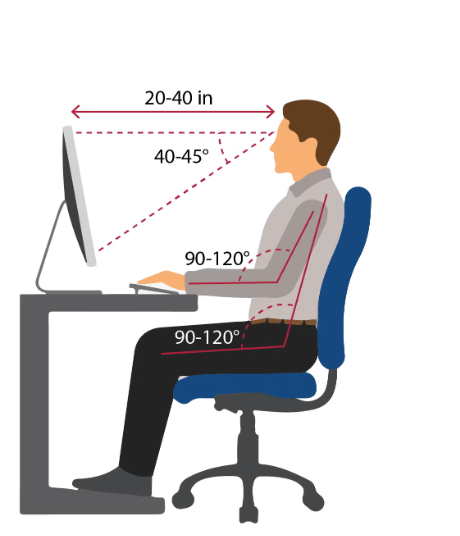
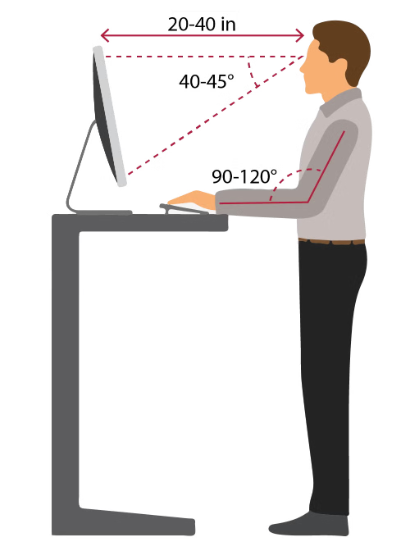
Ergonomic assessments and training are designed to analyze and evaluate an employee’s workspace, equipment, body mechanics, posture, and workflow to promote a more efficient and productive worker. Proper ergonomic design is necessary to make a job the most comfortable for the individual performing it to reduce the risk of developing a musculoskeletal disorder (MSD). MSDs are conditions that can develop over time, causing pain or injury to muscles, nerves, tendons, and joints. Neutral posture is a comfortable body position in which your joints are aligned. Working with a neutral body posture reduces muscle strain and stress. Learn about some potential solutions for discomfort in the office.
How to Schedule an Ergonomic Assessment
Step 1:
1. Log into CSU Learn
2. Go the Search icon and search for “CSUB Computer Workstation Ergonomics”
3. Launch the training, participate, and inform your supervisor and SRM when you
have completed the training
Step 2:
*Please inform your supervisor prior to booking an assessment.
After completing the CSU Learn “CSUB Computer Workstation Ergonomics” training, submit
a ServiceNow ticket and book your appointment. Use the link in the confirmation email to schedule time to have an EH&S Specialist visit you at your workspace and perform
an assessment.
Step 3:
Review SRM summary of ergonomic assessment provided to you and your supervisor. If
needed, reference equipment options provided below. (Summary will be provided withing
2 business days after assessment is completed).
Step 4 (If necessary):
Review SRM summary provided by SRM. If any equipment purchase is needed, SRM approval
is not required. SRM solely provides a recommendation, to ensure adequate equipment
is purchased to fit specific needs. Any equipment purchased must come from own department
funds and approval process. Please see available equipment options below.
Product Recommendations
The products listed below are examples of equipment that may be recommended following an ergonomic assessment. These examples are provided as options for supervisors to consider when addressing workstation-related risk factors or employee discomfort.
Product recommendations should be based on the employee’s individual needs and the findings documented in the completed Ergonomic Assessment Report. Supervisors should review the assessment report before purchasing any recommended furniture or equipment and follow CSUB Procurement procedures.
For questions regarding product information, availability, pricing, or quotes, please
contact the approved ergonomic vendors listed below:
Approved Ergonomic Vendor Contacts
PLEASE NOTE: CSUB's Purchasing department may require that an ergonomic assessment is performed before approving purchases of ergonomic equipment/products.
Keyboard Trays
*Available for testing at SRM Office during regular working hours
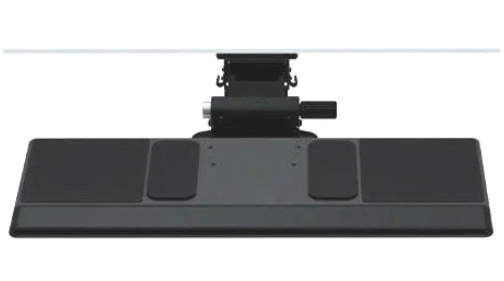
- Ultra-thin phenolic deck maximizes under-desk knee clearance
- Full-length hypoallergenic gel palm support cushions wrists
- Clip Mouse platform adjusts height, tilt, and swivel independently for left or right use
- High-strength 6G articulating arm provides stable support
- 7″ height adjustment (1.75″ above to 5.25″ below work surface)
- Knob-free and lever-free lift-and-lock height positioning
- 0° to -15° Dial-a-Tilt mechanism locks out harmful positive tilt
- Integrated angle gauge displays current slope
- 360° arm swivel at the track for easy entry and exit
- Fully stores beneath the desk on a standard 22″ track
- Compatible with short tracks (11″–18″) for shallow or sit-stand desks
- Available in black or white finish
Humanscale Keyboard Systems, Mechanism: For fixed height surfaces
Model/SKU 6G550-SMP2522
Humanscale Keyboard Systems, Mechanism: For height adjust surfaces
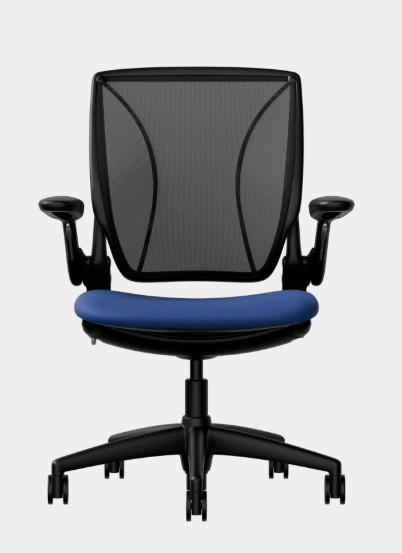
Task Chairs
*Available for testing at SRM Office during regular working hours.
- Patented weight-sensitive self-locking recline adjusts automatically to body weight
- Synchronized armrests adjust simultaneously in height with one-handed ease
- Dynamic, independently moving headrest cradles the neck automatically in recline
- Contoured body-fitting cushions sculpted to mimic natural spinal contours
- Die-cast aluminum frame ensures long-lasting structural strength
- Eliminates traditional manual tension knobs, locks, and complex levers
Model/SKU: F111BCF52XFSSNSC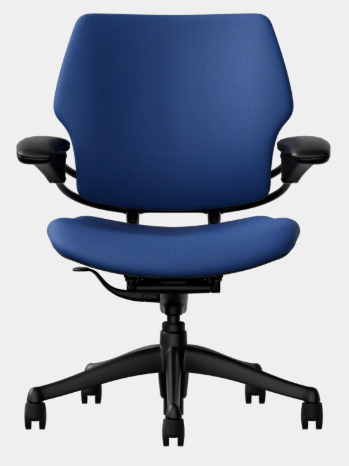
*Available for testing at SRM Office during regular working hours.
- Form-Sensing tri-panel mesh back automatically adapts to every user’s spine
- Counter-balance recline mechanism self-adjusts without tilt-lock levers or knobs
- Contoured, thick foam seat cushion provides balanced weight distribution
- Available with height-adjustable or fixed armrests connected directly to the backrest
- Contoured frame supports dynamic sitting and natural posture changes
- Streamlined aesthetic engineered for conference rooms and dedicated workstations
Model/SKU: L113LM14CF52XFSSNSC
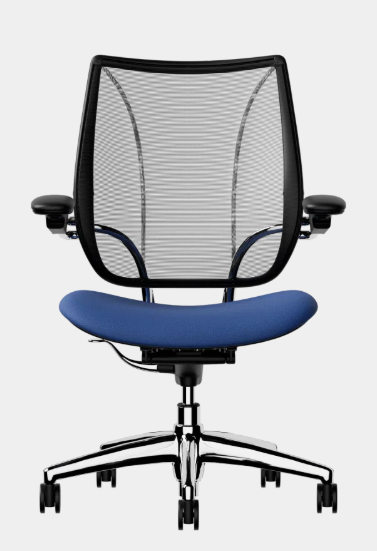
*Available for testing at SRM Office during regular working hours.
- All-mesh task chair utilizing weight-compensating recline without manual knobs
- Tri-panel Form-Sensing Mesh back cradles back and lumbar region automatically
- Frameless front seat edge eliminates pressure points behind the knees
- Low-maintenence mechanism-free recline uses body weight and physics
- Height-adjustable arms move with the recline motion
- Lightweight, eco-conscious construction designed with minimal moving parts
Model/SKU: WL11B1J10AU77SSC